Reports
Turn Data Into Clear, Actionable Insights
Turn Data Into Clear, Actionable Insights
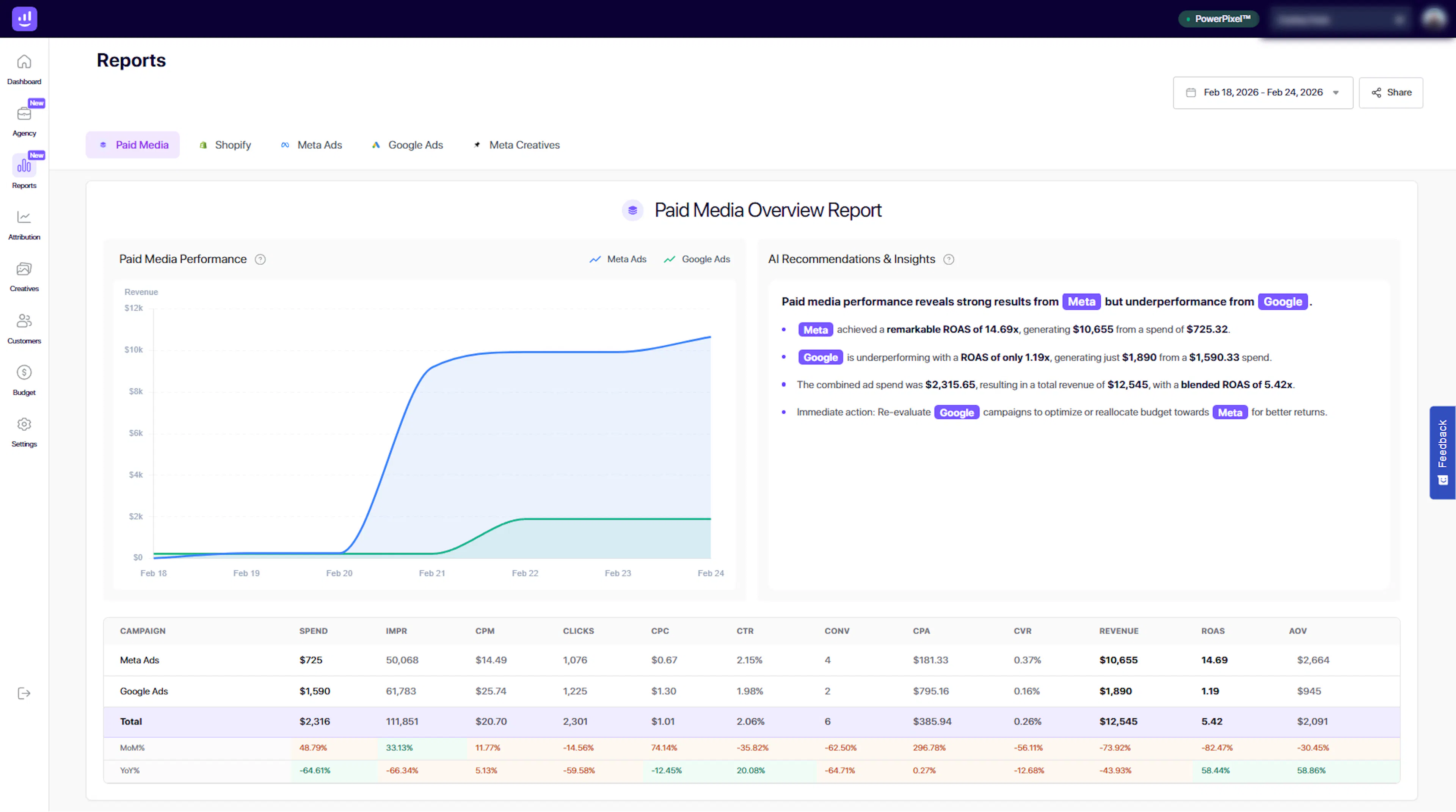
The Reports section in Growify allows you to analyze performance across your marketing channels with structured, easy-to-understand reports.
From high-level summaries to detailed breakdowns, Reports help you identify what’s working, uncover opportunities, and make confident, data-driven decisions.
What You Can Do in Reports
01. Analyze Paid Media Performance
Get a complete overview of your paid campaigns across platforms like Meta and Google Ads.
Track key metrics such as:
-
Revenue
-
Ad Spend
-
ROAS
-
CPA
-
CTR
-
Conversions
Visual charts and tables make it easy to spot trends and performance changes over time.
02. Compare Channels Side by Side
Quickly evaluate how each channel is performing.
Understand:
-
Which platform is driving the most revenue
-
Where your budget is most effective
-
Which campaigns need optimization
This allows you to allocate budget more efficiently and scale winning channels.
03. Leverage AI Recommendations & Insights
Growify AI analyzes your data and provides clear, actionable recommendations.
Examples include:
-
Identifying top-performing channels
-
Highlighting underperforming campaigns
-
Suggesting budget reallocation opportunities
This helps you move from data to action faster.
04. Break Down Campaign Performance
Dive deeper into campaign-level data with detailed tables.
View metrics like:
-
Impressions
-
Clicks
-
CPC
-
Conversion Rate (CVR)
-
Revenue and ROAS
This level of detail helps you pinpoint exactly where performance can be improved.
05. Track Performance Over Time
Use date filters to analyze performance across different time ranges.
-
Compare current vs previous periods
-
Identify growth trends or drops
-
Measure the impact of changes in your campaigns
Available Report Views
Growify provides multiple report views to match your workflow:
-
Paid Media – Performance across advertising platforms
-
Shopify – Store and revenue insights
-
Meta Ads – Meta-specific performance breakdown
-
Google Ads – Google Ads performance insights
-
Meta Creatives – Creative-level analysis
Switch between views to focus on the data that matters most.
How It Works
-
Select a report type (e.g. Paid Media)
-
Choose your date range
-
Review performance charts and tables
-
Analyze AI-generated insights
-
Take action based on recommendations
Why It Matters
Reports transform complex data into clear insights you can act on.
With Growify, you can:
-
Identify top-performing channels instantly
-
Reduce wasted ad spend
-
Optimize campaigns with confidence
-
Make faster, smarter marketing decisions
Pro Tip
Use Reports together with the Dashboard:
-
Dashboard → Quick overview and monitoring
-
Reports → Deep analysis and decision-making
Last updated 4 days ago
Built with Documentation.AI